Before you can do this you need to be a ukcampsite.co.uk member. Membership is free so why not join now!
Click on the icon at the top of the page to open the members section.
Scroll down to the Your Membership Profile box and click on Edit profile.
You will now have your members page open.
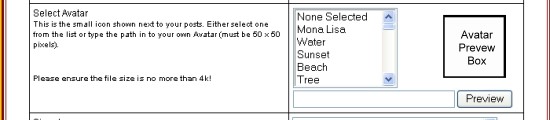
Scroll down to the Avatar box. see below.
You can choose any of the ones in the list box, then click Preview and they will show up in the Avatar Preview Box if you are happy with that click on Continue box at the bottom of the page.
Avatars should be no more than 50x50pixels and no bigger than 10k
If you want to add a picture to your avatar you will need to put the web address of the avatar(picture must be on the internet) in the box below the list box and adjacent to the Preview button. Once you have added the web address click on the Preview button and the picture should show in the Avatar Preview Box..
Thanks for that Papa Pip.How can I resize the pictures myself.The one you resized me was just an experiment,the one I would like om my avater is this one of my dog 'Blue'
------------- Sue & Phil
--------------------- I Love My AeroBed
All sorted Sue, Blue looks great by the way, an excellent photo too!
If you ever want to change it again just e-mail me your username, atach a pic or post on here and I will sort it out.
There are several online free photo image editors that you could use to sort pictures yourself, I use Ulead MX2004 which I find straightforward and easy enough to use.
You may well of got an editor with the software for your digital camera as well, depending on what program it came with etc.
If you have one installed look for rezise image and set the details of size to Pixels, Avatars should be 50 x 50 pixels and a good size for pictures in posts is 500pixels wide, signatures I find are best at maximum of 200 pixels, although you can go larger, the main point to watch out for is the size im KB.Most software comes with a how to guide which will explain how to use it and get the best from it. And of course there is always someone on here to help out too if it gets too tricky.
Thank you so much Papa Pip.I have windows vista photo gallery and also use Google Picasa.
Can you recommend me photo editing software that can do the resizing and works with windows vista.
Post last edited on 29/09/2008 16:15:59
------------- Sue & Phil
--------------------- I Love My AeroBed
hi Sue, just had a look at that one, which I had not come across before, it seems very straightforward and easy to use and using your picture I was very pleased to see a very similair result to the one I did earlier. Looks like one to keep in mind in the future.
Just remember to copy the picture to your webspace as soon as you have resized it as they clear the details every two hrs.
Not been brave enough to transfer to Vista yet, had to fix too many other folks PC problems who have changed over to find out that a lot of programs are not compatable. Bit like when XP first came out, only differences I got paid to fix them back then! lol
Picassa is a good we program which I have used in the past (pre- google) if you have microsoft office installed you may have the Microsoft Office Picture Manager on that, it may be in the office tools folder, that is fairly handy for resizing and doing simpe editing on pictures, it is verygood at batch processing files which is a handy thing if you have lotf pictures that you want to rename with the same title followed by sequential numbers, I tend to use that a lot when editing pictures from my digital camera, makes it easier to rename them something like 2008-aug-hols_1 etc.
Have a look at the digital photography section on CNET downloads, they tend to say if the progs are compatable with Vista etc. and they are all rated by folks like us who have downloaded them and used them which helps others.
Hi Papa Pip,well that site seems to work ok.Just found out that XP has a resizing tool,but Vista doesn't.And they call it progress.
Will have a look at that link you have posted above.
Once again,thanks for all your help.
------------- Sue & Phil
--------------------- I Love My AeroBed
No problem Sue, You may want to have a look at http://www.irfanview.com/ as well, seems to get good reviews on a few of the techy site and its another freebie!
It has more editable areas and is still as easy to use as it was originally, should work with Vista.
MS and progress, since windows 3.1.1 I think everytime windows do an update or release a new version there have en some great enhancements, however from milenium onwards it does appear that they started to lose some of the things that many of us found useful, generally speaking these are no an optional extra by way of another program to buy or are only avilable in the Pro and higher versions, no wonder microsoft make so much money. My dad and a few other folks I know are using Ubuntu which is a free alternative to windows, seems there is a growing number of users and the more that use it who have PC development awareness the better the program will get, Linux is another one that is doing the same sort of work and has a following. these days 67% of folks still use windows XP or alternatives with many Vista users asking for a downgrade (or upgrade depending how you look at it) to XP as it is a lot less hassle matching drivers etc. Office 2007 is a good improvement on Office XP in many ways but does need a bit of time to get used to it, personally still not willing to say if that is ood one yet as i only started to use it a few weeks back, like all things, progress is not always a good thing, especially when it hits our pockets! lol
A day of all things motorhome and campervan. The show is held both in the main indoor arena and across the grounds. Catering, hot drinks and food options are available. Easy access to the site and free parking included. Win one of five pairs of day tickets


 Topic: Insert An Avatar