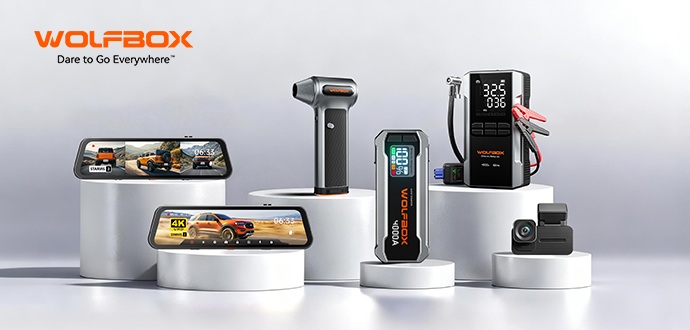
We are the team behind Wolfbox and we are excited to officially join this vibrant community. For years, Wolfbox has been dedicated to manufacturing high-quality, reliable in-car technology. We specialize in advanced dash cams (driving recorders) and essential automotive power solutions, all designed to significantly enhance your safety, security, and peace of mind on the road.
Featured Wolfbox Automotive Gear:
We want to highlight a few of our flagship products that have been making waves globally:
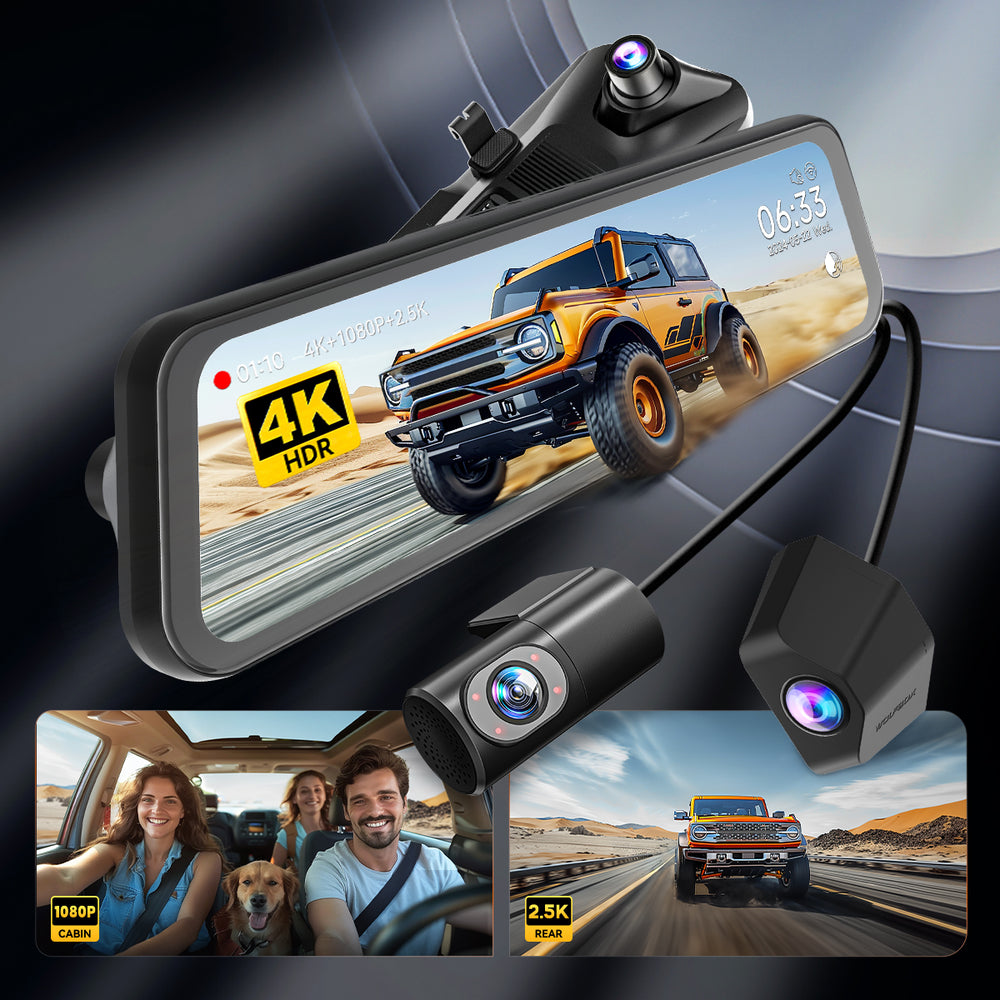
Our most advanced 4K triple-camera system designed for complete front, rear, and undercarriage visibility. It's the ultimate security setup, covering every angle of your vehicle for unparalleled evidence protection.
Discount Code: ukcampsite
Offer: £10 OFF your entire order
How to use: Simply enter the code ukcampsite at checkout on our official site to claim your discount!
We are here to answer any questions you have about our products, discuss new technology, and listen to your feedback. Feel free to drop a comment below and let us know which of our products catches your eye!
Thank you for having us!
Our website provides sales up to 30% off for this Spring Trail season:
·G900 Series Dash Cams: Record every journey in crystal-clear quality.
·MegaVolt24 Air: Portable power for all your devices, anytime, anywhere.
·MegaVolt24 4000A: Your ultimate car companion for emergencies.
·MegaFlow200 Air Duster: Keep your gadgets clean and running smoothly.
Don’t miss out—visit our website now to grab the gear you need at unbeatable prices. Start the year right with dependable, high-performance tools for every adventure!
I've got my G900TriPro installed now. Bought myself prior to the competitions here. Love to win another one though for my microcamper! Very pleased with it. Really like the voice control feature. The G Sensor that detects bumps & locks video is a bit sensitive even on it's lowest setting but plenty of storage on the microSD card & it's recommended to format it regularly so you get the space back.
As I have no rear view mirror & no mount for one I have it fitted to the dash using a third party mount & the Wolfbox bracket. The connectors are on top are hidden by a third party cover.
Wolfbox G900Pro: Total Visibility for Your Rig with a 2-in-1 Dash Cam and Backup Cam
Driving these rigs comes with one major catch: they are long, and your mirrors can only do so much. No matter how you set them, those rear and side blind spots are just part of the deal. Whether you are changing lanes or reversing into a spot, there is always a bit of extra stress and hassle involved.
That is exactly why we put together the Wolfbox G900Pro.
We wanted one straightforward device that acts as both a dash cam and a backup cam to give you your rear visibility back.
Eliminate Blind Spots: Dual-channel with 4K Front + 2.5K Waterproof Rear camera
It's a dual-channel setup with 4K in the front and a 2.5K waterproof camera in the back. The main goal is to give you a crisp, live feed of what's behind you while you're cruising.
We went with the Sony IMX678 sensor because it handles different lighting conditions really well. Whether it's regular daytime driving, low light, or even tricky backlight, the image stays clear enough to easily read plates and see road details.
Reversing assistance
When you're ready to park up at a pitch, it pulls up simple guidance lines to make backing into tight spots a whole lot easier.
Ultimately, the Wolfbox G900Pro is designed to cover those blind spots and tricky rear view situations that usually bother you. It takes the guesswork out of the trip so you can focus entirely on the peace of mind that comes with getting close to nature in your rig.
12 inch Touch Screen
The large display makes it easy to toggle between the front and rear cameras. You can also use the split screen mode if you want a full view of your surroundings at a single glance.
High Speed Wi-Fi and App Sync
We upgraded this to 5.8GHz Wi-Fi, which is a massive jump from the standard 2.4GHz versions. It pushes download speeds up to 8MB/s, so you can pull footage to your phone for insurance or sharing without sitting around waiting for a progress bar.
Voice Control
You can keep your hands on the wheel and manage all the basic functions with simple voice commands. It is a small detail that makes a big difference when you need to stay focused on the road.
24 Hour Parking Monitoring
This mode watches over your rig while you are away. It automatically records any incidents, giving you peace of mind while parked up for the night.
Setting a new standard for video resolution, the G900Pro features an 8MP IMX678 sensor with enhanced low-light sensitivity. With 5.8G WiFi and voice control, it delivers unmatched clarity and seamless connectivity.
This advanced 3-channel system features Starvis 2 and Purecel® Plus technology for crystal-clear, comprehensive coverage. Choose between the waterproof bumper cam or the infrared cabin cam to suit your needs.
Featuring a unique removable battery design and three-speed control, the MF200 delivers 190+ MPH of focused airflow. It is the ideal solution for cleaning vehicle interiors, electronics, and various outdoor gear.
👉🔗 Wolfbox MegaVolt 24Air — 4-in-1 Jump Starter with Air Compressor
This versatile, portable unit integrates high-performance jump-starting, tire inflation, fast charging, and emergency lighting into a single, reliable tool for any journey.
Firmware Upgrade Went Sideways? How To Unbrick Your Dash Cam G900 Tripro? Guide Here!
If your G900 Tripro device is experiencing issues such as freezing or lagging after updating to firmware version 251103. To efficiently resolve these issues, please refer to the following instructions:
Verify Information: First, confirm the firmware version prior to the update. Please note: Do not disconnect the power or remove the SD card during the firmware update, as this may cause the update to fail.
Solution: Re-upgrade the firmware using the “Force Reset Update” method (see below for specific steps);
Instructions and Firmware:
1. First, download the appropriate firmware file to your computer (contact Customer Support to obtain it);
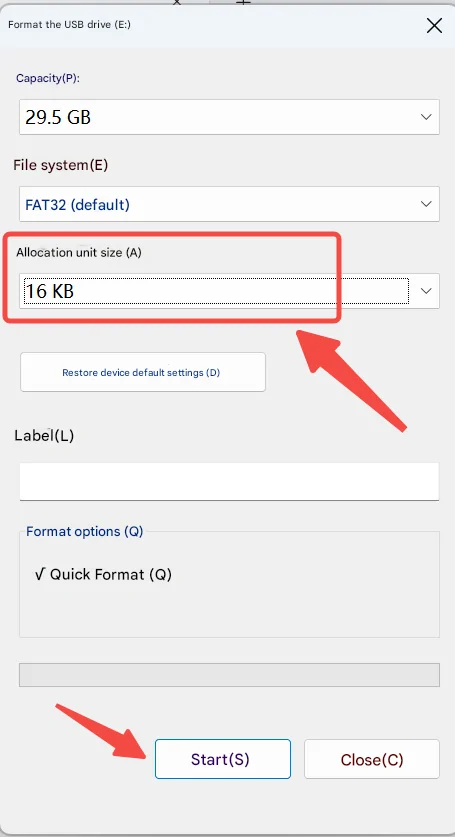
2. Prepare a 32GB memory card, connect it to your computer via a card reader, and format it to 16KB as shown in the attached image (Note: When formatting, select the FAT32 file system and set the allocation unit size to 16KB);
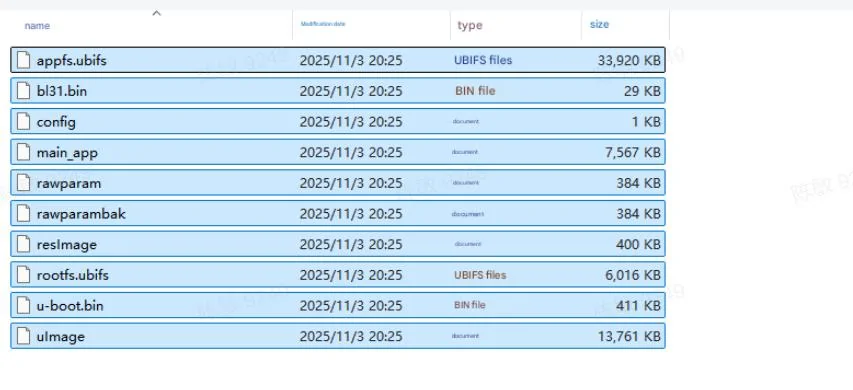
3. Keep the memory card connected to the computer (or reconnect it via a card reader), and copy all downloaded firmware files to the memory card. Refer to the attached image for instructions;
4. Firmware Update Procedure:
` First, disconnect the device from the power source;
` Reinsert the memory card containing the firmware into the device;
` Use a SIM card pin to press and hold the reset button on the back of the device marked with an “R”;
` Simultaneously plug in the power cable to power on the device, and continue holding the reset button for approximately 5 seconds until you see a red light flashing in the GPS slot, indicating that the update has started;
` At this point, you may release the SIM eject tool and stop holding the reset button. Wait for the firmware update to complete automatically (do not disconnect the power or remove the memory card during the update process).
Post your unboxing photos, install shots, or first impressions in this thread. Show the community what you got and help others decide — your review could be the push someone needs ??
Drop your order screenshot below and let's get this started!
A day of all things motorhome and campervan. The show is held both in the main indoor arena and across the grounds. Catering, hot drinks and food options are available. Easy access to the site and free parking included. Win one of five pairs of day tickets


 Topic: Wolfbox Official | Exclusive Member Offer




 via mobile 16/3/2026 at 3:59pm